Security
Is your bucket public? Keeping customer files private in AI products
November 26, 2026
Someone on X claimed a company had left its customers' files open to the internet. I was skeptical of the claim when I replied. It did raise a question worth asking about any product that accepts uploads. When a customer signs in to see a private file, what keeps someone else from opening the file directly?
Apps often store uploads in a service such as Amazon S3 or Cloudflare R2. A bucket is a container for those files. The app controls who can open a page. The storage service has its own rules for who can download a file.
Consider a blank preview on an otherwise working page. A coding agent can make the image appear by allowing public reads on the bucket. The customer sees the fix. Anyone with the image address can now see it too, and the same change may expose other uploads in that bucket. This is why I'd look at the storage change before signing off on the ticket.
Where customer files can leak
- A public address for private uploads. Product logos and customer documents can end up in the same bucket. If the team makes the bucket public to serve the logos, the documents may become readable at their own addresses. A long, random filename offers little protection once someone shares the link.
- A storage key in the browser. Customers can inspect the code an app sends to their devices. A storage credential included in that code gives its holder whatever access the credential carries. Broad permissions can turn a single leaked key into access to several customers' files.
- A download link that outlives its purpose. A temporary link may end up in a support ticket, analytics event, or error report. Anyone who obtains a valid link can use it until it expires. A week is a long time for a link the product needed for one download.
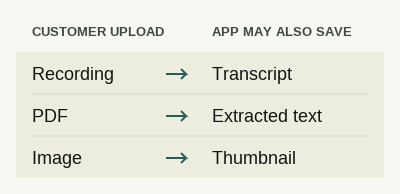
- Copies created during processing. An AI feature may save a transcript, extracted text, or a thumbnail separately from the upload. Those files can contain the same private information. Include them when reviewing access and deciding what happens after a customer presses Delete.
How to serve a private file
Start with who should have access. That may be the uploader alone, members of a shared workspace, or specific people the owner invited. Engineering needs that decision to implement the permission check.
One common design keeps the bucket private. When someone requests a file, the app checks whether that person may read that particular file. If so, it returns a signed URL, a temporary address that authorizes the download. The browser can then fetch the file directly from storage.
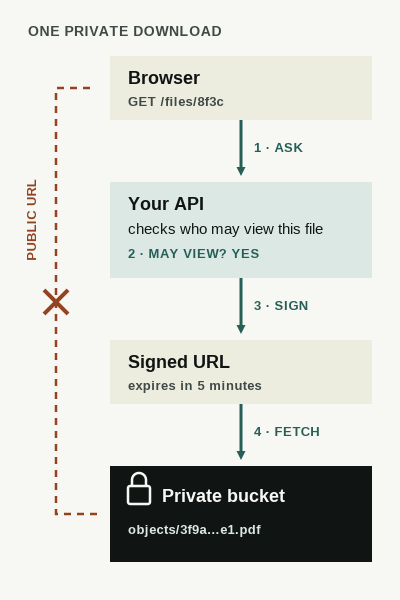
The app checks permission when it issues the link. Forwarding a valid link lets the recipient download the file too. Choose a lifetime that suits the task and keep signed URLs out of logs. If access must be checked again on every request, the app can serve the file itself. How signed URLs work in Amazon S3
Four prompts to review your product with a coding agent
Open the agent in your project repository and give it the name of a feature that handles customer files. Start with read-only access. You can use the first two prompts with the code alone and bring an engineer in for the deployed settings.
1. Where do we keep customer files?
Follow one upload through [feature name]. List the original file and any thumbnails, extracted text, transcripts, or other copies the code saves. For each, tell me where it goes, which part of the product uses it, and what happens when the customer deletes the upload. Cite the files you used. Omit customer data, credentials, and signed links.
2. Who can read them?
Review how this feature serves files. Explain what the owner, another customer, a signed-out visitor, and someone with a forwarded link can each open according to the code. Identify where the app checks permission for the requested file. Check the lifetime of download links and whether storage credentials or signed links could appear in browser code or logs. Cite locations without printing secret values.
3. What do we need to confirm with engineering?
Identify the storage provider and each route this product uses to serve customer files. Which read-only settings or redacted screenshots would let our engineer confirm who can use each route in production? Ask for the evidence you need, explain why, and leave the settings unchanged. When we provide it, flag any routes whose access rules are still unclear.
4. What should we fix first?
Summarize the storage issues supported by this review in order of customer impact. For each, describe which files are affected, who could gain access, the smallest fix, and an acceptance criterion QA can check using synthetic files and team-controlled accounts. List any sharing or retention decisions that need product input.
What to look for in the settings
For Amazon S3, have engineering check the effective Block Public Access settings alongside the policy for the customer bucket. S3 applies controls at several levels, including the account and the bucket. Ask which services can read or write the files and whether each needs that access. A service that generates thumbnails has little reason to administer every bucket. AWS guide to Block Public Access
For Cloudflare R2, check both the development address ending in r2.dev and any custom domain connected to the bucket. The two work independently. A team can protect the custom domain with Cloudflare Access while the development address still serves the same files publicly. Cloudflare guide to public buckets
If you find exposed files, close the public route, revoke any leaked credentials, and preserve the available logs. Establish which files were reachable and for how long. Whether anyone downloaded them is a separate question. On S3, for instance, CloudTrail records object reads only if the relevant data events were enabled during the exposure. If you have no equivalent access records, tell affected customers what you know and where the record ends. AWS guide to S3 logging